When you have an SR open with Oracle needing a bug fix, most of the times the status would be indicated in codes. Here is the list of codes and what it means...thought would come in handy:
10 - Description Phase: Development is requesting more information.
16 - Support bug screening: Bug is being reviewed by our Bug Diagnostics group.
11 - Code Bug (Response/Resolution): Bug is being worked by Development.
30 - Additional Information Requested: Bug is being worked by Support and/or more information was requested by Development.
37 - To Filer for Review/Merge Required: Bug has been fixed but the patch will be merged into the next patchset.
80 - Development to Q/A: Bug is being regression tested for future release.
81 - Q/A to Dev/Patch or Workaround Avble: Patch released via Metalink.
90 - Closed, Verified by Filer: Bug has been fixed and is closed.
91 - Closed, Could Not Reproduce: Bug is closed as not reproducible.
92 - Closed, Not a Bug: Bug is closed as not a bug (not reproducible or setup issue).
93 - Closed, Not Verified by Filer: Bug has been fixed and is closed.
95 - Closed, Vendor OS Problem: Bug is closed as an OS problem.
96 - Closed, Duplicate Bug: Bug is closed as a duplicate bug.
Wednesday, April 22, 2009

Friday, April 17, 2009
ORA-38856 - while opening a cloned RAC database
I was attempting to open a cloned RAC database and got the following error:
SYS@NETFRD1> alter database open resetlogs;
alter database open resetlogs
*
ERROR at line 1:
ORA-38856: cannot mark instance UNNAMED_INSTANCE_2 (redo thread 2) as enabled
The fix was to use the undocumented parameter - _no_recovery_through_resetlogs=TRUE to open the database. I guess this is one of those scenarios where Oracle suggests using this undocumented/unsupported parameter. Here is what I did to get pass the problem:
1. Shutdown;
2. Startup mount (with the parameter _no_recovery_through_resetlogs=TRUE set in init.ora)
3. Open the database with RESETLOGS;
SYS@NETFRD1> alter database open resetlogs;
alter database open resetlogs
*
ERROR at line 1:
ORA-38856: cannot mark instance UNNAMED_INSTANCE_2 (redo thread 2) as enabled
SYS@NETFRD1> shutdown immediate;
ORA-01109: database not open
Database dismounted.
ORACLE instance shut down.
SYS@NETFRD1> !vi /tmp/init$ORACLE_SID.ora
SYS@NETFRD1> startup mount pfile=/tmp/init$ORACLE_SID.ora
ORACLE instance started.
Total System Global Area 1577058304 bytes
Fixed Size 2084232 bytes
Variable Size 385876600 bytes
Database Buffers 1174405120 bytes
Redo Buffers 14692352 bytes
Database mounted.
SYS@NETFRD1> alter database open resetlogs;
Database altered.
SYS@NETFRD1> alter database open resetlogs;
alter database open resetlogs
*
ERROR at line 1:
ORA-38856: cannot mark instance UNNAMED_INSTANCE_2 (redo thread 2) as enabled
The fix was to use the undocumented parameter - _no_recovery_through_resetlogs=TRUE to open the database. I guess this is one of those scenarios where Oracle suggests using this undocumented/unsupported parameter. Here is what I did to get pass the problem:
1. Shutdown;
2. Startup mount (with the parameter _no_recovery_through_resetlogs=TRUE set in init.ora)
3. Open the database with RESETLOGS;
SYS@NETFRD1> alter database open resetlogs;
alter database open resetlogs
*
ERROR at line 1:
ORA-38856: cannot mark instance UNNAMED_INSTANCE_2 (redo thread 2) as enabled
SYS@NETFRD1> shutdown immediate;
ORA-01109: database not open
Database dismounted.
ORACLE instance shut down.
SYS@NETFRD1> !vi /tmp/init$ORACLE_SID.ora
SYS@NETFRD1> startup mount pfile=/tmp/init$ORACLE_SID.ora
ORACLE instance started.
Total System Global Area 1577058304 bytes
Fixed Size 2084232 bytes
Variable Size 385876600 bytes
Database Buffers 1174405120 bytes
Redo Buffers 14692352 bytes
Database mounted.
SYS@NETFRD1> alter database open resetlogs;
Database altered.
Monday, February 16, 2009
ORA-39006, ORA-39065,ORA-25306,ORA-39079 while exporting using EXPDP
Encountered the following error messages which attempting to do an export of a database using Data Pump utility with 10.2.0.4:
ORA-39006: internal error
ORA-39065: unexpected master process exception in DISPATCH
ORA-39079: unable to enqueue message DG,KUPC$S_3_20090213124234,MCP, ,1,Y
ORA-06512: at "SYS.DBMS_SYS_ERROR", line 86
ORA-06512: at "SYS.KUPC$QUE_INT", line 924
ORA-25306: Cannot connect to buffered queue's owner instance
ORA-39097: Data Pump job encountered unexpected error -39079
ORA-39065: unexpected master process exception in KUPC$QUEUE_INT.PUT_STATUS
ORA-39079: unable to enqueue message DG,KUPC$S_3_20090213124234,MCP, ,1,Y
ORA-06512: at "SYS.DBMS_SYS_ERROR", line 86
ORA-06512: at "SYS.KUPC$QUE_INT", line 924
ORA-25306: Cannot connect to buffered queue's
This seems to be a bug but couldn't find any published information in metalink. Setting the value for the parameters aq_tm_processes to 4 from a value of 0 worked. There are several other databases with the default setting of 0, but they don't seem to have problems with expdp. Hopefully, this will have a fix in 10.2.0.5.
Hope this helps others who encounter similar errors.
Sunday, February 8, 2009
Bypassing/ignoring or skipping ORA-1555 errors
I was researching a corruption issue using various Metalink link notes and stumbled upon a note/bug which provides a way to ignore or skip ORA-1555 errors for queries. Obviously, this will result in getting inconsistent data/result-set. As of now, I am not sure as to what type situations will have a practical use of this feature. This is available in Oracle 11g 11.1.0.7. This is done using a hint - SCN_ASCENDING.
Example:
In Session 1:
chandra@AEDB01:11g> Select Distinct phone from acs_emp;
PHONE
--------------------
972-500-8999
1 row selected.
In Session 2:
chandra@AEDB01:11g> Select /*+ scn_ascending */ * from acs_emp;
While this session is in progress, I have updated the phone column:
Back in Session 1:
chandra@AEDB01:11g> update acs_emp set phone='888-888-8888';
100000 rows updated.
chandra@AEDB01:11g> commit;
Commit complete.
Back to Session 2 where our select was in progress: You will notice that we got data which was NOT consistent with the data which existed at the point in time when the query was initiated. The SCN got changed in the middle - meaning inconsistent / questionable data!. Without the above mentioned HINT, it wouldn't have been possible to see such inconsistent result set. Hopefully, this hint is a well-intentioned one.
650831 972-500-8999
650831 972-500-8999
650831 972-500-8999
650831 972-500-8999
650831 972-500-8999
650831 972-500-8999
650831 972-500-8999
650831 972-500-8999
650831 972-500-8999
650831 972-500-8999
650831 972-500-8999
652088 888-888-8888
652088 888-888-8888
652088 888-888-8888
652088 888-888-8888
652088 888-888-8888
652088 888-888-8888
652088 888-888-8888
652088 888-888-8888
652088 888-888-8888
652088 888-888-8888
Example:
In Session 1:
chandra@AEDB01:11g> Select Distinct phone from acs_emp;
PHONE
--------------------
972-500-8999
1 row selected.
In Session 2:
chandra@AEDB01:11g> Select /*+ scn_ascending */ * from acs_emp;
While this session is in progress, I have updated the phone column:
Back in Session 1:
chandra@AEDB01:11g> update acs_emp set phone='888-888-8888';
100000 rows updated.
chandra@AEDB01:11g> commit;
Commit complete.
Back to Session 2 where our select was in progress: You will notice that we got data which was NOT consistent with the data which existed at the point in time when the query was initiated. The SCN got changed in the middle - meaning inconsistent / questionable data!. Without the above mentioned HINT, it wouldn't have been possible to see such inconsistent result set. Hopefully, this hint is a well-intentioned one.
650831 972-500-8999
650831 972-500-8999
650831 972-500-8999
650831 972-500-8999
650831 972-500-8999
650831 972-500-8999
650831 972-500-8999
650831 972-500-8999
650831 972-500-8999
650831 972-500-8999
650831 972-500-8999
652088 888-888-8888
652088 888-888-8888
652088 888-888-8888
652088 888-888-8888
652088 888-888-8888
652088 888-888-8888
652088 888-888-8888
652088 888-888-8888
652088 888-888-8888
652088 888-888-8888
Wednesday, September 3, 2008
java.lang.UnsatisfiedLinkError: libawt.so: libXp.so.6 during 10g Install on OEL 5.0
Today, while I attempting to install Oracle10gR2 (10.2.0.1) on a new server with Oracle Enterprise Linux 5.0, got the following error when OUI was invoked.
java.lang.UnsatisfiedLinkError: libawt.so: libXp.so.6: cannot open shared object file: No such file or directory
Later, found that the package libXp-1.0.0-8.i386.rpm doesn't get installed by default with OEL 5.0. Once the package was installed, the OUI was good to go!
[root@rhvm01 RPMs]# rpm -ivh libXp-1.0.0-8.i386.rpm
warning: libXp-1.0.0-8.i386.rpm: Header V3 DSA signature: NOKEY, key ID 37017186
Preparing... ########################################### [100%]
1:libXp ########################################### [100%]
[root@rhvm01 RPMs]#
java.lang.UnsatisfiedLinkError: libawt.so: libXp.so.6: cannot open shared object file: No such file or directory
Later, found that the package libXp-1.0.0-8.i386.rpm doesn't get installed by default with OEL 5.0. Once the package was installed, the OUI was good to go!
[root@rhvm01 RPMs]# rpm -ivh libXp-1.0.0-8.i386.rpm
warning: libXp-1.0.0-8.i386.rpm: Header V3 DSA signature: NOKEY, key ID 37017186
Preparing... ########################################### [100%]
1:libXp ########################################### [100%]
[root@rhvm01 RPMs]#
Monday, May 19, 2008
Oracle Home Cloning For RAC
A short note on the steps for cloning Oracle Home for RAC:
1. On all Nodes: Copy existing ORACLE_HOME binaries to a new OH location
$cp -pr /opt/oracle/product/10.2.0.2 /opt/oracle/product/10.2.0.4
2. Add entries for the new Oracle_HOME into the inventory
1. On all Nodes: Copy existing ORACLE_HOME binaries to a new OH location
$cp -pr /opt/oracle/product/10.2.0.2 /opt/oracle/product/10.2.0.4
2. Add entries for the new Oracle_HOME into the inventory
- CD to the new OH: cd /opt/oracle/product/10.2.0.4/clone/bin
- perl clone.pl ORACLE_HOME=/opt/oracle/product/10.2.0.4 ORACLE_HOME_NAME=Ora10g_10204 "CLUSTER_NODES=alps,everest" "LOCAL_NODE=alps"
- Execute /opt/oracle/product/10.2.0.4/root.sh script as root.
- Apply the 10.2.0.4 patchset unto the newly created OH
Sunday, April 27, 2008
APEX Configuration - 11g
APEX is included with the default Oracle11g installation. You can check if the APEX component is included in the installation by verifying the existence of apex directory under $OH and also by checking DBA_REGISTRY:
SQL> Select comp_name, version, status from dba_registry where comp_name
2 like '%Express%';
COMP_NAME VERSION STATUS
------------------------------ ------------------------------ -----------
Oracle Expression Filter 11.1.0.6.0 VALID
Oracle Application Express 3.0.1.00.08 VALID
Configuring APEX
1. Login as SYSDBA and run the script $OH/apex/apxconf
SQL> @apxconf
PORT
----------
8080
Enter values below for the XDB HTTP listener port and the password for the Application Express ADMIN user.
Default values are in brackets [ ].
Press Enter to accept the default value.
Enter a password for the ADMIN user [] chandra
Enter a port for the XDB HTTP listener [ 8080]
...changing HTTP Port
PL/SQL procedure successfully completed.
PL/SQL procedure successfully completed.
Session altered.
...changing password for ADMIN
PL/SQL procedure successfully completed.
Commit complete.
SQL>
2. Set the port number:
SQL> exec dbms_xdb.sethttpport(8080);
PL/SQL procedure successfully completed.
3. Unlock the ANONYMOUS ACCOUNT:
4. Logon to APEX using http://hostname:8080/apex/apex_admin
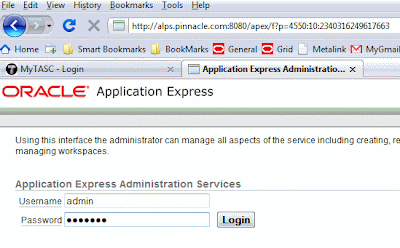
Use ADMIN as the username and the password which we used at step one above.
5. Create a WORKSPACE
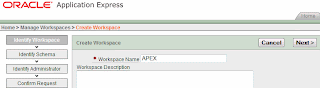
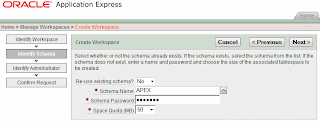
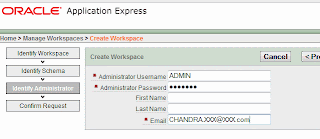
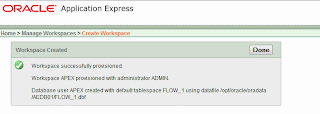
With this we will have a WORKSPACE to start creating our own applications.
SQL> Select comp_name, version, status from dba_registry where comp_name
2 like '%Express%';
COMP_NAME VERSION STATUS
------------------------------ ------------------------------ -----------
Oracle Expression Filter 11.1.0.6.0 VALID
Oracle Application Express 3.0.1.00.08 VALID
Configuring APEX
1. Login as SYSDBA and run the script $OH/apex/apxconf
SQL> @apxconf
PORT
----------
8080
Enter values below for the XDB HTTP listener port and the password for the Application Express ADMIN user.
Default values are in brackets [ ].
Press Enter to accept the default value.
Enter a password for the ADMIN user [] chandra
Enter a port for the XDB HTTP listener [ 8080]
...changing HTTP Port
PL/SQL procedure successfully completed.
PL/SQL procedure successfully completed.
Session altered.
...changing password for ADMIN
PL/SQL procedure successfully completed.
Commit complete.
SQL>
2. Set the port number:
SQL> exec dbms_xdb.sethttpport(8080);
PL/SQL procedure successfully completed.
3. Unlock the ANONYMOUS ACCOUNT:
4. Logon to APEX using http://hostname:8080/apex/apex_admin

Use ADMIN as the username and the password which we used at step one above.
5. Create a WORKSPACE


With this we will have a WORKSPACE to start creating our own applications.
Subscribe to:
Posts (Atom)


